

AI Actions and limits
An AI Action is a dispatched website Ability attempt. It is not every message you send to an AI app, and it is not every MCP tool call.
What counts
- An Ability attempt that reaches the WordPress dispatch marker counts, whether it succeeds, returns an error, or has an unknown outcome.
- Listing websites, inspecting health, discovering Integrations or Abilities, reading an Ability's schema, and reading account context do not consume AI Actions.
- A request refused before WordPress dispatch does not consume an AI Action. A temporary reservation for that request is released.
- High-impact Abilities use the same allowance; there is no second high-impact meter.
Sending a fresh request again can be another charged attempt. Retrying after reconnecting is not an exactly-once guarantee.
Check your usage
Select the correct Workspace, then open Settings → Usage & Limits. Check the allowance, used amount, remaining capacity, and reset information shown for that Workspace.
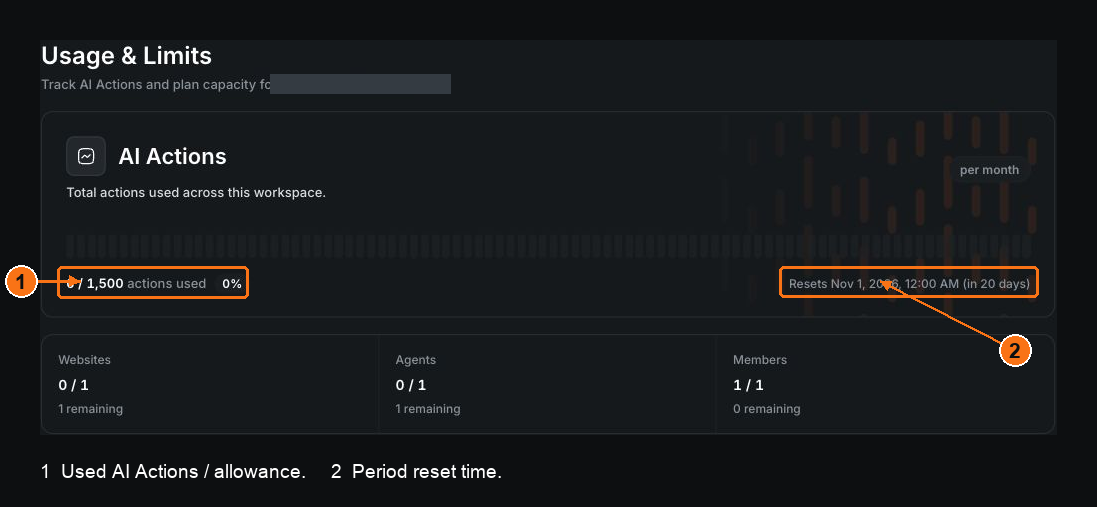
Demonstration Workspace. The annotations identify the AI Actions meter and its period information; the numbers are an example, not your account's allowance.
Owners can manage plans in Billing. Members see shared usage and their own contribution without gaining access to the owner's financial details.
Periods and timezone
The meter belongs to the Workspace. Its period keeps fixed start and end times; changing a plan or timezone does not reset it immediately. A timezone change takes effect for the next period. Use the reset time displayed in the product instead of assuming midnight in your computer's timezone.
Allowance versus request throttling
Running out of AI Actions and sending requests too quickly are different limits. Waiting for a short request throttle will not refill a depleted allowance. Read the error and the Workspace's usage before deciding what to do.
An exhausted AI Actions allowance does not by itself delete websites or pause resources. See Usage-limit problems.